
The Browser Agent Demo Is Not the Product. The Permission Model Is.
Browser agents become useful when they touch real logged-in work. That is also when the product stops being the click loop and becomes scope, approval, receipts, and revoke.
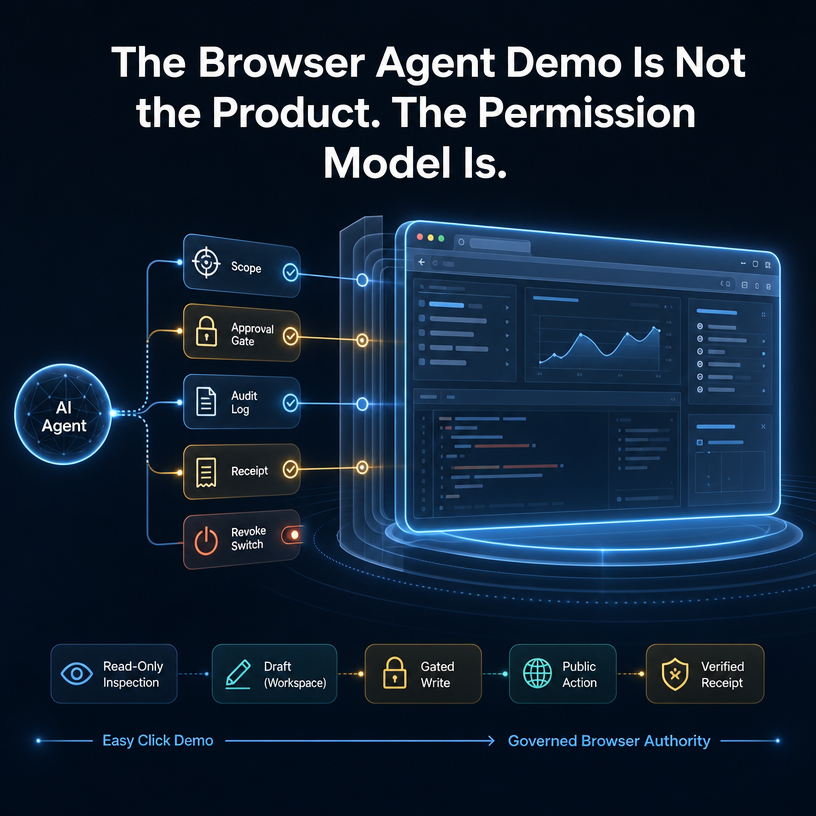
The browser-agent demo is easy to understand.
The agent opens a website. It clicks. It fills a form. It fixes a broken UI. It posts the thing. It looks like a human moving through software.
That is useful. It is also not the product.
The product begins when the browser is signed in.
A signed-in browser is not just a UI surface. It is authority: inboxes, CRMs, admin dashboards, billing pages, customer records, CMS tools, social accounts, support queues, internal portals, and all the half-integrated web software where real work still happens.
That is why browser agents are becoming valuable. Operators are drowning in logged-in tools, too many tabs, fragmented dashboards, and workflows that APIs do not cover cleanly.
It is also why the demo is incomplete.
Once an agent can touch a real browser session, the question is no longer only:
Can it use the browser?
The production question is:
What authority did we delegate, what was the agent allowed to do with it, and what receipt did it leave behind?
The browser-agent demo is not the product.
The permission model is.
A browser demo proves capability, not trust
A browser demo can prove that an agent understands a page.
It can show that the model can inspect the DOM, interpret a screenshot, click the right button, or recover from a small UI mismatch.
That is real progress. But in a logged-in workflow, capability is only the first layer.
A click inside a public demo page is harmless. A click inside a signed-in business tool may:
- send an email,
- update a CRM record,
- approve a refund,
- publish a page,
- change a price,
- merge a customer account,
- submit a form,
- spend money,
- or expose private data.
Those are not the same action.
They should not share the same permission.
This is where browser-agent products need to stop treating “browser access” as one checkbox. Read-only inspection, drafting, internal edits, external sends, purchases, deletes, refunds, and public publishing are different risk classes.
The browser is one surface. The authority behind each action is not.
Signed-in browser access is delegated authority
The reason agents want the browser is simple: the browser already has the user’s working context.
Your logged-in Chrome knows which account is active. It has cookies, open sessions, local state, tabs, dashboards, and workflows that would take weeks to re-create through clean integrations.
That is why “use the browser I already use” is such a powerful primitive.
But it changes the trust model.
When an agent uses a fresh cloud browser, the product mostly controls the execution environment. When an agent uses the user’s real signed-in browser, the product is mediating delegated authority.
That distinction matters.
The useful primitive is not:
this agent can use a browser
It is:
this agent can use this session, for this job, on these surfaces, with these gates, while leaving these receipts, until I revoke it.
That is a product surface.
It includes scope. It includes approvals. It includes logs. It includes identity. It includes a revocation path.
Without that, a successful browser demo can quietly become an operational liability.
Blanket permission feels fast until the risk class changes
Blanket permission is attractive because it removes friction.
Nobody wants a modal before every harmless click. Nobody wants an agent that asks for approval every time it reads a page, opens a tab, or drafts a response.
The problem is not autonomy.
The problem is when the system cannot tell that the action changed class.
An agent reading a support ticket is one class. Drafting a reply is another. Sending the reply to a customer is another. Issuing a refund is another. Changing the refund policy in the admin panel is another.
Those transitions are where the permission model matters.
The alternative to blanket permission is not endless prompts. It is action-aware delegation:
- let the agent inspect low-risk pages,
- let it draft changes without submitting,
- allow reversible internal updates inside a defined scope,
- gate writes that notify people or change customer/account records,
- require explicit approval for spend, delete, publish, refund, merge, or other high-impact actions,
- revoke the session when the job is done.
That is how browser agents become usable without becoming reckless.
Completion needs receipts, not just clicks
A browser agent should not claim success because it clicked a button.
Clicked is not done.
The receipt is the state after the click: the saved record, the sent message, the published URL, the updated dashboard, the confirmation screen after reload, the audit trail, or the visible diff.
This matters because browser workflows are full of false positives.
A button can click and fail silently. A form can submit and then reject server-side validation. A page can update optimistically and roll back. A post can appear in a composer but never publish. A CRM record can save locally but not persist. A checkout can advance one step without completing.
If the browser agent is operating with real authority, the receipt has to prove more than motion.
It should answer:
- What did the agent change?
- Which session did it use?
- Which task was it acting under?
- Which approval boundary did it cross?
- What evidence shows the final state?
- Can a human inspect or replay enough context to trust the result?
This is why screenshots and traces are useful, but not always sufficient. A screenshot says what the browser showed. A workflow receipt should explain what changed, why it was allowed, and how the final state was verified.
Tool-call policy is not enough for browser authority
The agent tooling ecosystem is moving toward policy layers around tool calls: schemas, MCP gateways, approval steps, isolation, DLP checks, and host-defined rules.
That direction is right.
But browser actions are messier than normal tool calls.
A structured tool call can say:
{
  "tool": "refund_order",
  "args": {
    "order_id": "123",
    "amount": 42
  }
}
A browser action may only say:
click buttonThe meaning depends on the page, the session, the current account, the surrounding form, and the state of the workflow.
A click can mean “open details” or “delete customer.” A submit button can mean “save draft” or “publish publicly.” The same UI action can be harmless in one app and irreversible in another.
So browser permissioning needs to understand more than command syntax.
It needs to understand the authority boundary around the session and the risk tier of the action.
The useful model: scope before, gates during, receipts after
For browser agents, the control model should be simple enough to explain and strict enough to matter.
Scope before execution
Before the agent acts, define the job.
Which browser session is available? Which sites are in scope? Which tabs or workflows can it touch? Is it reading, drafting, updating, publishing, spending, or deleting?
The agent should not get “the browser.”
It should get a bounded delegation.
Gates during execution
During the run, the system should notice when the agent is about to cross a higher-risk boundary.
Reading a CRM page may be fine. Updating a field may need a log. Emailing the customer may need approval. Issuing a refund should probably need a stronger gate. Deleting the account should be outside the job entirely unless explicitly granted.
The point is not to interrupt every click.
The point is to put friction where authority changes.
Receipts after action
After the agent acts, it should leave evidence.
Not just “done.”
A useful receipt includes the action class, the delegated session or account context, the approval boundary, the final verified state, and enough audit trail for a human to inspect what happened.
This is how browser agents move from demos to operations.
Where BrowserMan fits
BrowserMan is built around a specific category bet:
the browser session is authority, and users should be able to delegate that authority carefully.
BrowserMan connects agents to a user’s real Chrome session. Cookies and credentials stay in the user’s browser. Agents can run elsewhere. Access can be scoped, audited, approved, and revoked.
That is different from simply launching another browser for the agent.
Cloud browser infrastructure is useful when the agent needs a reliable remote execution environment. Browser frameworks are useful when developers need better control primitives. Browser automation tools are useful when a task can be scripted end-to-end.
BrowserMan’s lane is delegated real-browser authority: the agent needs to work in the same logged-in web environment the user already uses, but the user should not have to hand over the whole house.
The practical promise is not “the agent can click.”
It is:
- use the real Chrome session when that is where the work lives,
- keep cookies local,
- delegate a job instead of sharing credentials,
- scope what the agent can touch,
- gate risky actions,
- log what happened,
- revoke access when the job is over.
That is the permission model as the product.
The category will compete on trust, not just clicks
The browser-agent market is moving quickly.
Some products optimize cloud browser scale. Some optimize visual control. Some optimize local desktops. Some optimize persistent agent computers. Some optimize tool-call policy and runtime isolation.
All of that matters.
But once the agent touches a signed-in browser, the durable question becomes sharper:
Can I safely delegate the authority behind this browser session?
The winners will not only be the systems that click fastest.
They will be the systems that know when a click is just navigation, when it is a draft, when it is a write, when it is a public action, and when it should stop.
The demo gets the agent into the browser.
The permission model decides whether it belongs there.